Hotel Wi-Fi Upselling: Generate Extra Revenue with Paid Guest WiFi
Guest Wi-Fi has long ceased to be a mere cost factor – it is a genuine source of revenue. With a clever freemium model, you offer free basic Wi-Fi to everyone – and sell faster premium WiFi as an upgrade. Specialist providers such as The Cloud make this fully automated and legally compliant. This guide shows you which Wi-Fi upsells make sense, how the technology works and how to set it all up in your hotel step by step.

Contents
- Why paid guest WiFi?
- The freemium model: free vs. premium
- Worthwhile Wi-Fi upsells
- Providers such as The Cloud at a glance
- How does it work technically? (Captive portal)
- Setting it up in your hotel: step by step
- Pricing and packages
- Billing: Add to Room Bill and access codes
- Legal matters and data protection
- Wi-Fi as a marketing channel
- Practical guide for hoteliers (checklist)
- Frequently asked questions from hoteliers
- Best practices for more Wi-Fi revenue
1. Why paid guest WiFi?
Fast internet is now part of any hotel's basic amenities – no guest will accept a paywall just to send a simple email. Even so, you can make money from Wi-Fi without annoying your guests. The trick: you give away basic Wi-Fi and monetise the premium bandwidth.
This makes sense for several reasons:
- Genuine demand: business travellers, streamers and families with lots of devices are willing to pay for stable high-speed connections
- Virtually no marginal costs: a premium ticket sold creates hardly any additional cost – the contribution margin is extremely high
- Automated: the sale runs entirely through the captive portal, without reception having to step in
- Data capture: the login provides you with valuable guest data for marketing and personalisation
- Extra revenue per room: even a few euros per occupied room add up to a meaningful line item over the year
2. The freemium model: free vs. premium
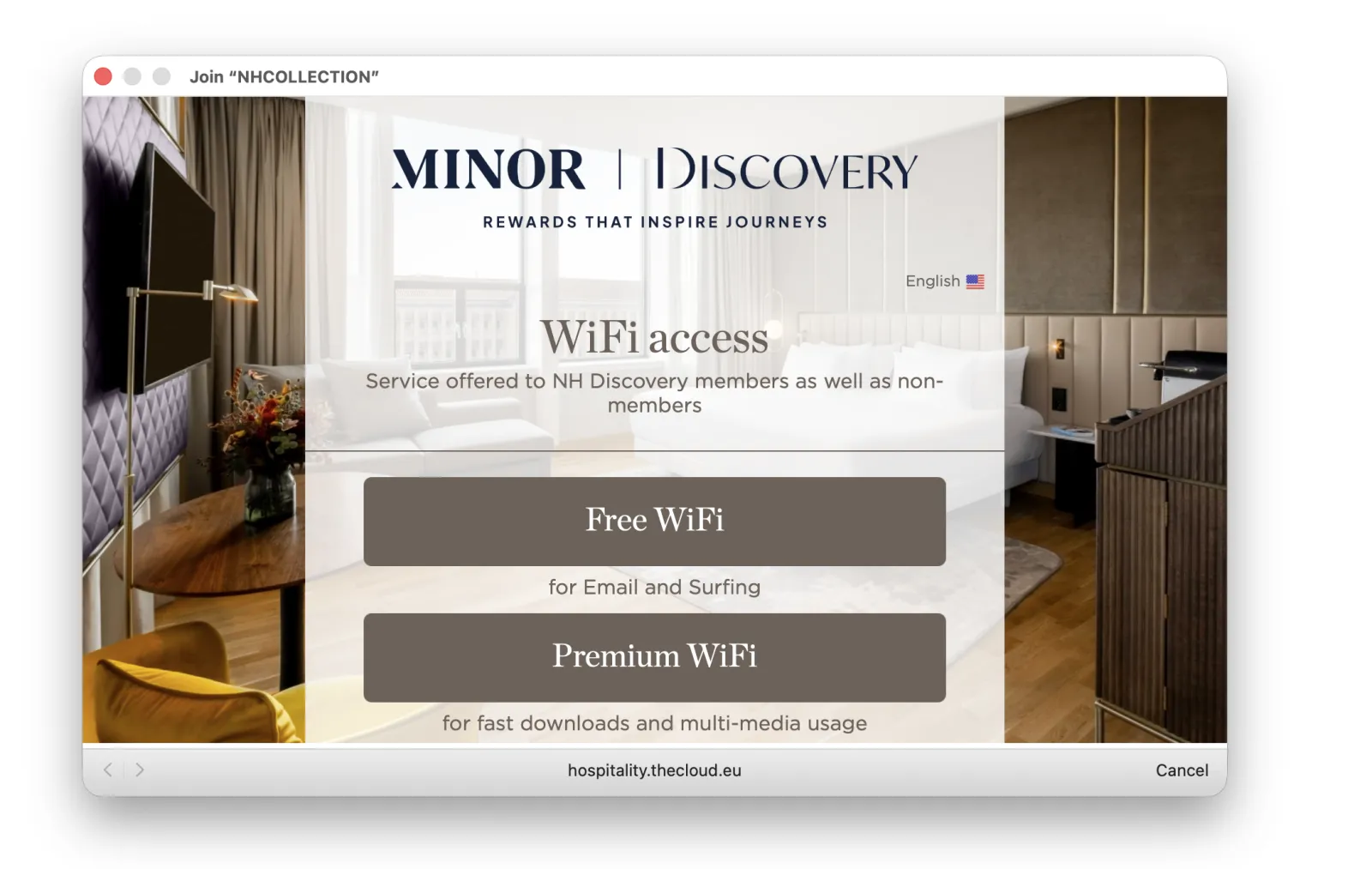
By far the most successful model for guest WiFi is freemium. After connecting, the guest lands on a login page (the so-called captive portal) and chooses between two options:
- Free WiFi: free of charge, throttled bandwidth – sufficient for email, messaging and normal browsing
- Premium WiFi: paid, full speed for streaming, video calls, large downloads and several devices at once
This is exactly how The Cloud does it in many hotels of the Minor and NH groups, for example: guests decide for themselves whether the free offer is enough or whether they upgrade to premium for their stay.
3. Worthwhile Wi-Fi upsells
The Wi-Fi portal is not just a place to sell bandwidth – it is a touchpoint that every guest is guaranteed to see. In our experience, these upsells work particularly well:
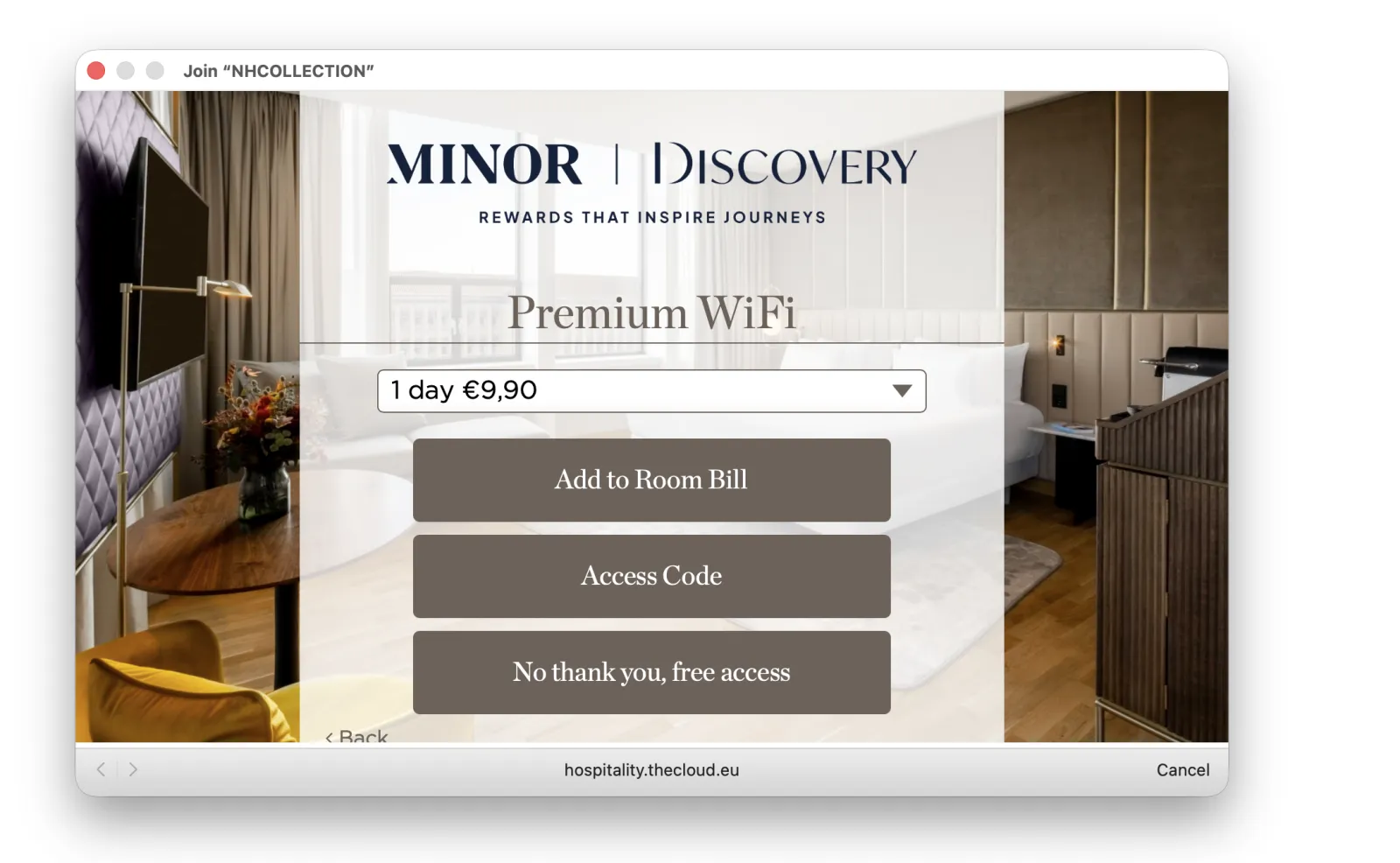
- Speed upgrade: "Premium WiFi – full speed for €9.90 per day"
- Flat rate for the stay: one package for the entire stay instead of per day (higher spend, fewer abandoned purchases)
- Multi-device package: a surcharge for 5+ devices at once – ideal for families and teams
- Streaming package: prioritised bandwidth for Netflix, Disney+ and the like
- Combined with other services: offer a Wi-Fi upgrade bundled with late check-out or room upgrades at check-in
- Sponsorship / advertising: local partners (restaurants, spas, attractions) pay for placement on the login page
The beauty of it: these upsells work without a sales conversation. Guests decide for themselves on screen – just as with digital self check-in, where upgrades can also be booked with a single click.
Premium Wi-Fi is just one of many levers for increasing revenue per guest. For a complete overview of the best opportunities – from room upgrades and breakfast to spa – see our guide to the best upsell opportunities for hotels.
4. Providers such as The Cloud at a glance
You don't have to build the technology yourself. Specialist WiFi providers deliver hardware, captive portal, billing and support as a complete package. The best-known provider in the DACH region (Germany, Austria, Switzerland) is The Cloud (part of the Wifirst group), which specialises in hospitality, among other sectors.
What such providers typically offer:
- Plug-and-play hardware: access points and controllers tailored to the size of the hotel
- Branded captive portal: a login page in your hotel's look, multilingual
- Payment processing: credit card, "Add to Room Bill" (charged to the room bill) or access codes
- 24/7 support: a technical hotline for guests and the hotel
- Legal compliance & GDPR: data-protection-compliant processing, login data, filtering
- Reporting: usage, revenue and user behaviour in a dashboard
Other providers on the market include Wifirst, Hotspot System, Socifi and local IT service companies. When choosing, pay attention to PMS integration, billing models and references from the hotel industry.
Example: The Cloud for hospitality
The Cloud explicitly positions itself as a provider of turnkey network solutions for hotels and campsites – as well as for railway stations and airports. The starting point is a problem every hotelier knows: unstable or slow Wi-Fi is one of the most common reasons for poor guest reviews. Guests – whether business travellers or holidaymakers – now expect fast, reliable connections.
What makes the provider interesting from a hotelier's perspective (according to The Cloud Hospitality):
- Tailor-made network concepts: taking into account technical conditions, building infrastructure and – explicitly – your budget
- Personalised offers for guests: the connectivity solution lets you deliver your own offers and messages via the portal (exactly the upsell lever described in this guide)
- Turnkey & 24/7 support: all-round support so that the public WiFi runs reliably around the clock
- Financing options: attractive financing for the entire product range – useful if you want to spread the initial investment
- Personal consultation: an individual consultation appointment with the industry solutions team
Contact for hoteliers: The Cloud Networks Germany GmbH, Leuchtenbergring 3, 81677 Munich · Phone +49 89 419 422-0 · Sales [email protected] · technical 24/7 hotline (free of charge) 0800 222 555 2. Sales office hours: Mon–Fri, 8:30 am–5:00 pm.
5. How does it work technically? (Captive portal)
At the heart of paid Wi-Fi is the captive portal – the page that appears automatically as soon as a device connects to the Wi-Fi. The process in detail:
- Connection: the guest selects the hotel Wi-Fi (SSID) and is automatically redirected to the login page
- Selection: free or premium – for premium, the package and price selection follows
- Authentication: room number + name, access code or card payment
- Activation: the RADIUS server authorises the device and unlocks the corresponding bandwidth
- Session management: time- or data-based limits, automatic disconnection on expiry
Bandwidth management (traffic shaping) ensures that free users are throttled and premium users are prioritised. All of this runs on the provider's controller – you don't need to configure anything manually.
6. Setting it up in your hotel: step by step
Here's how to go about introducing paid guest WiFi:
- Assess your needs: how many rooms, what guest mix (business vs. leisure), what bandwidth does your internet connection deliver?
- Check your connection: for a worthwhile premium offer you need sufficient uplink – upgrade your connection if necessary
- Choose a provider: obtain quotes (e.g. from The Cloud), clarify the billing model and PMS integration
- Coverage & hardware: plan Wi-Fi coverage (site survey), install access points in rooms and public areas
- Brand the captive portal: design the login page with your logo, colours and multilingual copy – ideally in the style of your hotel website
- Set packages & prices: define free throttling, premium tiers and prices
- Set up billing: connect the payment integration and/or "Add to Room Bill" to the PMS
- Test: run through the login flow, payment, speed and billing with test devices
- Train your team: brief reception on packages, codes and frequently asked questions
- Go live & monitor: go live, then track usage and conversion in the dashboard and optimise
7. Pricing and packages
In German-speaking countries, prices for premium WiFi typically fall within this range:
- Day pass: €5–12 per day (in the screenshot above: €9.90 / day)
- Stay package: €15–30 for the entire stay
- Premium per device vs. per room: room packages usually convert better because they feel "fair"
Recommendations from practice:
- Offer no more than two or three packages – too much choice lowers conversion
- Highlight a stay package as the "recommended" option (anchoring effect)
- Communicate prices as an add-on at check-in, not only once guests are in their room
- In luxury properties, premium Wi-Fi can also be included – here you sell additional services rather than bandwidth

8. Billing: Add to Room Bill and access codes
Three payment methods have become established for premium WiFi – you can see them clearly in the screenshot above:
- Add to Room Bill: the amount is charged directly to the room bill. Convenient for the guest, no credit card details needed – requires a PMS integration
- Access Code: pre-generated access codes that reception hands out or sells – ideal for conference guests, vouchers or as compensation for complaints
- Direct payment: credit card or wallet directly in the portal – also works without a room booking (e.g. for restaurant or bar guests)
"Add to Room Bill" is the highest-converting option because the barrier is minimal: one click, no payment form. It requires a clean interface between the WiFi platform and your property management system.
9. Legal matters and data protection
When operating guest Wi-Fi in Germany, there are a few points you should bear in mind:
- Secondary liability (Störerhaftung): since secondary liability for Wi-Fi operators was abolished (2017), they are no longer automatically liable for user behaviour – a professional provider also takes care of content filtering and logging
- GDPR: login and usage data are personal data. You need a transparent privacy policy and a data processing agreement (DPA) with the provider
- Consent for marketing: if you want to use email addresses from the Wi-Fi login for newsletters, you need a proper opt-in
- Price information: premium prices must be clear and visible before purchase (German Price Indication Ordinance)
The advantage of a provider such as The Cloud: these issues are already covered as standard. Nevertheless, coordinate the specific implementation with your data protection officer.

10. Wi-Fi as a marketing channel
Every guest sees the captive portal – often several times a day. That makes it one of the most valuable marketing spaces in your property:
- Drive direct bookings: banners highlighting the benefits of booking direct for the next stay
- Collect reviews: automatically ask for a Google review after check-out
- Cross-selling: give the restaurant, spa, events and local excursions prominent placement
- Social media: links to Instagram & co. for greater reach (see hotel social media marketing)
- Email marketing: an opt-in during the login process for later campaigns
If you make clever use of the guest data you collect and the Wi-Fi touchpoint, you turn pure IT infrastructure into an active sales channel – one building block in holistic hotel marketing. Combined with an AI concierge, you can even address guests directly via the portal and answer their questions automatically.

11. Practical guide for hoteliers (checklist)
So that you can get started right away, here is the step-by-step guide in four phases – from preparation to day-to-day operation. Tick off the points in order.
Phase 1 – Preparation (1–2 weeks)
- Record the number of rooms, public areas (lobby, restaurant, outdoor areas) and your typical guest mix
- Check your current internet line: how much bandwidth (download/upload) is available? Is it enough for premium?
- Take stock of existing hardware (routers, switches, access points, cabling)
- Note down your PMS (e.g. Protel, Opera, Mews, Apaleo, ASA) – important for "Add to Room Bill"
- Define your goal: extra revenue, better reviews, fewer support calls – or all of the above
Phase 2 – Provider & quote (1–3 weeks)
- Obtain and compare 2–3 quotes (e.g. from The Cloud Hospitality)
- Clarify the billing model: flat fee, revenue share or rental/financing of the hardware
- Have the PMS integration confirmed (can the provider charge premium WiFi to the room bill?)
- Check references from the hotel industry and the availability of 24/7 support
- Request a site survey / Wi-Fi coverage plan from the provider so that there are no dead spots
Phase 3 – Setup (1–2 weeks)
- Install access points in rooms and public areas (or have them installed)
- Brand the captive portal: hotel logo, colours, welcome text, multilingual – in keeping with your hotel website
- Configure the free and premium tiers (free "good enough", premium noticeably faster)
- Create packages & prices (e.g. day pass €9.90, stay package as the recommended option)
- Activate payment methods: "Add to Room Bill", access code and/or credit card
- Test run with several devices: check login, payment, speed and billing in the PMS
Phase 4 – Go-live & operation (ongoing)
- Train the reception team: packages, codes, common guest questions, escalation to the 24/7 hotline
- Actively promote the premium offer: at check-in, in the booking confirmation and on room cards
- Track KPIs in the dashboard: conversion rate, revenue per occupied room, package distribution
- Optimise monthly: test prices, portal copy and the order of packages
- Take Wi-Fi outages seriously as a review risk and resolve them quickly via the provider's support
12. Frequently asked questions from hoteliers
Doesn't paid Wi-Fi annoy guests?
No – as long as the basic Wi-Fi remains free and fit for everyday use. Guests only pay for the extra service (high speed, streaming, many devices). Anyone who just checks their emails pays nothing and is happy.
Do I need in-house technical expertise?
No. Providers such as The Cloud deliver turnkey solutions including installation, configuration and 24/7 support. Your team only needs to know the sales process at reception.
What does it cost to get started?
Depending on the size of your property, there are one-off hardware/installation costs and a monthly fee. Many providers offer financing options so that you can spread the initial investment. For details on marketing and technology budgets, see our overview of hotel marketing prices.
Does this also work for campsites or small guesthouses?
Yes. The Cloud explicitly serves campsites too – and the concepts scale from a small guesthouse to a large resort. What matters is good coverage and an adequately sized internet connection.
Is paid guest Wi-Fi GDPR-compliant?
Yes, provided there is a privacy policy, the necessary consents and a data processing agreement with the provider. Professional providers cover these requirements as standard (see section 9).
13. Best practices for more Wi-Fi revenue
- Keep free Wi-Fi fair: "good enough" for free builds trust – and is what makes premium attractive in the first place
- Keep the login as short as possible: every additional field costs conversion
- Prioritise "Add to Room Bill": the simplest payment method converts best
- Think multilingual: offer the portal in the languages of your main target groups
- Communicate at check-in: actively mention the premium offer – digitally or at reception
- Design matters: a professional, on-brand portal sells more than a standard technical page
- Measure and optimise: regularly analyse conversion rate, revenue per room and package distribution
Paid guest WiFi is one of the few sources of ancillary revenue in a hotel that runs almost fully automatically and with a high margin. Set up correctly – with a strong provider, a clean freemium model and a conversion-optimised portal – a cost factor becomes a profitable revenue stream. We show you how to embed digital services like this into a coherent overall strategy in our guides to hospitality marketing and AI for hotels. To find out what individual measures cost, see our overview of hotel marketing prices.